

Universal Audio LUNA 3.0: Architecture and Ecosystem Novelties
The Universal Audio production ecosystem has taken a giant leap with the release of version 3.0 of its flagship DAW this very week in September 2026. LUNA 3.0 completely redefines the workflow in the modern studio, breaking the historical barrier between analog recording and MIDI-based electronic music production. This massive update focuses on operational immediacy, artificial intelligence integration, and advanced editing. Whether you operate on macOS or Windows, you have at your disposal a professional-grade audio engine optimized to minimize latency via Accelerated Realtime Monitoring (ARM). Before entering the booth or the studio, it is vital to understand the two sides of this platform.
- LUNA Free: The free access version. Includes unlimited tracks, the new Piano Roll, smart editing tools, LUNA Play, Oxide Tape emulation, 4-track stem separation, and a base package of 8 UAD plugins. No credit card required, no time limits, and no watermarks.
- LUNA Studio: The definitive premium version that replaces LUNA Pro. Unlocks console and tape extensions (API, Studer, Ampex), over 30 UAD plugins and instruments, support for 6 ARA plugins, external hardware inserts, 6-track stem separation, Audio-to-MIDI conversion, lyric transcription, and chord extraction powered by Moises. Available via a one-time payment or through the UAD Spark Studio subscription.
Phase 1: Download, Installation, and Environment Setup
Before sequencing the first bar, you need to prepare your workstation. The process is centralized in the brand's official manager. Follow this strict procedure to ensure a clean installation and avoid license conflicts with your third-party plugins.
- Open the UA Connect application on your operating system.
- Navigate to the UAD Explore FREE tab if you are going to install the free version, or access the LUNA Studio section if you own the premium license or the UAD Spark Studio subscription.
- Click the Download button located next to the LUNA 3.0 icon and wait for the audio engine installation to finish.
- Open iLok License Manager and authorize your license. You can link it directly to your local computer or to a physical USB dongle for greater portability in live settings.
- Launch LUNA from your system. In the completely redesigned Dashboard, select Create New Session for a blank project, or use the predefined templates in the Recent Sessions section.
Phase 2: Immediate Capture with LUNA Play
Inspiration is volatile. LUNA Play is the crown jewel of this update, functioning as a supercharged voice memo app designed specifically for music creators. Its goal is to eliminate the technical friction of creating tracks, routing buses, and adjusting gains manually. Here is how you should use this tool to record ideas in a matter of seconds.
- Access the main Dashboard and click the LUNA Play Quick Start module.
- Connect your microphone, synthesizer, or guitar to the physical input of your Apollo or Volt interface.
- Start playing or singing immediately. The LUNA algorithm will automatically detect the type of instrument or incoming audio source.
- Watch as the system automatically adjusts recording levels via its auto-gain function, ensuring optimal dynamic range and preventing digital clipping.
- Let the software automatically assign a chain of presets (Channel Strip Presets) with UAD plugins optimized specifically for your sound source.
- Click the master Record button and capture your take instantly, without having created a traditional multitrack session. Later, you will be able to export this idea to the full Timeline.
Phase 3: Surgical Isolation with Stem Separation
Sampling and bootleg creation reach a new dimension in LUNA 3.0. The integrated stem separation allows you to deconstruct any stereo audio file directly in your session, without relying on external web portals. It is a lethal tool for extracting acapellas or isolating percussion from old vinyl records.
- Drag a stereo audio file from your file explorer directly into the arrangement window (Timeline).
- Right-click on the imported audio clip to open the context menu and select the Stem Separation option.
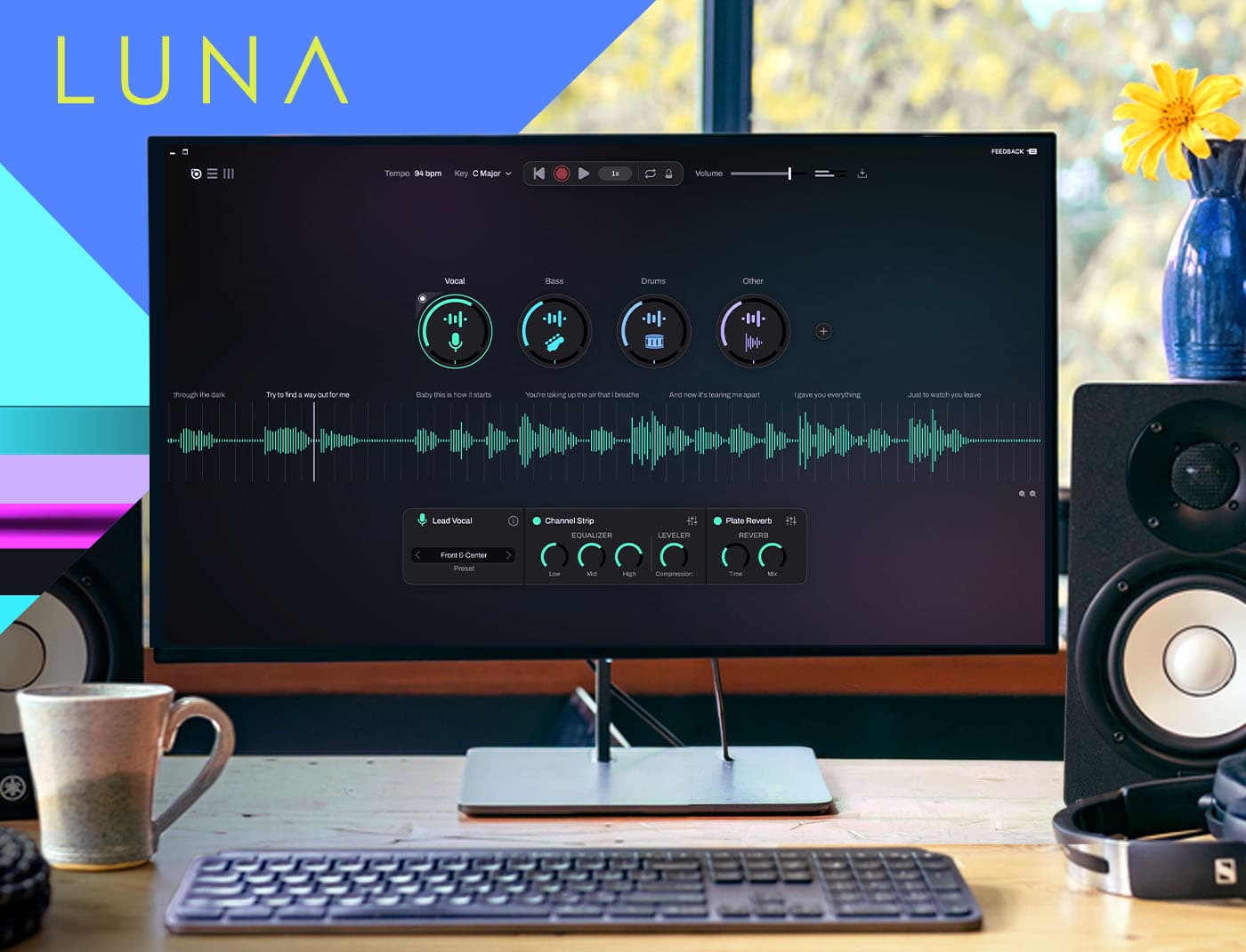
- If you use LUNA Free, the processing engine will divide the audio into 4 discrete tracks (Vocals, Drums, Bass, and Other).
- If you have LUNA Studio, the advanced algorithm will extract up to 6 independent stems, offering millimeter control over secondary harmonic elements.
- Use the Mute and Solo buttons on the newly generated tracks to isolate the acapella, extract the drum break, or create an instrumental track in seconds.
Phase 4: Advanced Sequencing with the New Piano Roll and Adaptive Grid
Rhythm and bassline programming is the core of electronic production. LUNA 3.0 completely redesigns its MIDI clip editor, incorporating smart functions that drastically speed up pattern writing.
- Double-click on any MIDI clip in the timeline to display the new Piano Roll in the lower area of the interface.
- Activate the Scale-Aware Editing function by selecting the musical key of your track in the top menu. All notes that fall outside the harmonic scale will be hidden, ensuring you never program a dissonant note by mistake.
- Zoom in or zoom out on the grid. Thanks to Adaptive Grid technology, the quantization value will adjust dynamically according to your zoom level, saving you constant trips to the grid resolution menu.
- Modify the intensity of each hit using the new Velocity Control tool, dragging the vertical handles integrated directly into each MIDI event.
- Use the Fold and Fit functions on the left panel to collapse empty note lanes, visualizing only the percussion elements or melodic notes you are actively using.
Phase 5: Organization and Analog Summing with Folder Tracks
Maintaining visual and structural order in sessions with more than 50 tracks is non-negotiable. The new Folder Tracks combine hierarchical organization with audio bus routing in a single move, simplifying group processing.
- Select multiple tracks in the Mixer or arrangement view by holding down the Shift key.
- Right-click on the selection and choose the Move to Folder Track option.
- Assign a descriptive name to the folder (for example, 'Drum Bus' or 'Synth Group').
- Verify that the audio flow of the contained tracks is automatically routed through the main folder. Now you can insert a stereo bus compressor directly into the Folder Track to glue the entire group together.
- Click the arrow icon located next to the folder name to collapse or expand the nested tracks, freeing up crucial visual space on your monitor.
Phase 6: Artificial Intelligence (Moises) - Transcription and Chord Extraction
Exclusive to the LUNA Studio version, the deep integration with Moises technology provides the DAW with unprecedented analytical capabilities. Lyric transcription and harmonic extraction transform the way you interact with complex recordings.
- To extract the harmonic progression: Select a polyphonic audio clip (a rhythm guitar or a piano), right-click, and select Extract Chords.
- Watch as the chords detected by the AI are automatically mapped to the new Chord Track (chord ruler) located at the top of the Timeline.
- Make sure to activate the ARA Plug-Ins Follow Chords option so that your compatible pitch tools automatically adjust to the detected progression.
- To transcribe vocals: Select a lead vocal track, right-click, and choose Lyric Transcription.
- Open the Lyrics Browser panel. The engine will transcribe the full lyrics of the song automatically. Click on any word in the text and the Playhead will instantly jump to that exact syllable in the audio waveform.
Phase 7: Audio-to-MIDI Conversion and Creative Workflows
Extracting the human groove from an audio percussion loop or the melody of an analog bassline to trigger virtual synthesizers is now a native process. Keep in mind that this function requires having Celemony Melodyne installed and operating under the LUNA Studio license.
- Select the audio clip whose performance you wish to capture.
- Apply Melodyne via ARA integration directly to the track to analyze pitch and timing.
- Activate the Audio-to-MIDI Conversion function from the clip's top options menu.
- Drag the newly generated MIDI data block to an empty virtual instrument track.
- Assign a VST or UADx synthesizer (like the Minimoog) to play back the exact same performance, maintaining the timing imperfections and the musician's original intent.
Phase 8: Surgical Cleaning with Strip Silence and Clip Gain Automation
A punchy mix demands pristine tracks. LUNA 3.0's new editing tools allow you to purge your recordings of unwanted noise before the signal hits the first dynamic processor in your chain.
- Select a vocal or percussion track that contains background noise or bleed from other microphones.
- Activate the Strip Silence tool in the toolbar. Adjust the Threshold parameter so the system automatically detects audible regions and removes sections of silence or background noise in one go.
- Use Clip Gain Automation to make detailed volume adjustments directly on the waveform.
- Draw gain nodes with the mouse to attenuate loud sibilance or breaths. Since it is a Pre-FX process, you ensure that your subsequent compressors react uniformly and predictably.
- Activate the Notes View on ARA-enabled audio tracks to visually toggle between the traditional waveform and the note-block-based representation, facilitating pitch editing.
Phase 9: Routing Optimizations and Click Track Automation
Small quality-of-life details make the difference in intensive recording sessions. Universal Audio has implemented highly requested improvements from the community to streamline routing and metronome control.
- Record mono sources on stereo channels: Select a stereo track in the mixer. In the Input section, choose a Mono Input from your interface directly. LUNA will route the signal to the center of the stereo panorama automatically, eliminating the need to create intermediate buses.
- Automate the metronome: Expand the metronome lane and activate Click Track Automation. Draw automation curves to turn the click on, off, or alter its volume in specific sections of the track (ideal for ambient passages or intros without rhythm).
Perspective: The TechnoBeatsCloud Verdict
Universal Audio has transformed LUNA from a simple recording environment exclusive to Apollo users into a top-tier standalone DAW. Version 3.0 masterfully blurs the line between spontaneous composition and high-end mix engineering. The inclusion of AI-powered tools and substantial improvements in the MIDI workflow make it a formidable option for electronic music producers.
- Pros: The LUNA Play function is a paradigm shift for capturing ideas without technical friction. Native stem separation (available even in the free version) and Moises tools drastically accelerate the creative sampling process. The new Piano Roll with Adaptive Grid and Folder Tracks definitively solve the software's historical shortcomings in the MIDI and organization departments.
- Cons: The most advanced and attractive features (6-track separation, Audio-to-MIDI, chord extraction, and lyric transcription) are locked behind the LUNA Studio paywall ($199 USD one-time payment or included in the UAD Spark Studio subscription). Additionally, Audio-to-MIDI conversion requires owning third-party licenses such as Celemony Melodyne.